can somebody please help me ,as I am in a quandary.I have a brush cutter that I bought online from a reputable business in Sydney ,they have been more than helpfull trying to help me out but the problem is this.Some parts fell off the brush cutter due to vibrating once started,causing the air filter housing (plastic) to fall off,as well as the screws holding it together.I have foned the company up explaning the problem ,Sent them an email with pictures ,but the email came back telling me that the fotos were to big (file size) .so my problem is how do I downsize the fotos ,to be able to send them on .If anyone can help me it would be greatly appreciated.and if they could keep it simple that would be even better..
Plain Truth said
05:19 PM Feb 10, 2015
I use Photo Razor,look it up on the Internet,down load the program,works well
cruisaderhilton said
05:30 PM Feb 10, 2015
Thankyou for the reply but I also need someone to talk me through it as computer skills are not one of my specialties thanks.
Plain Truth said
07:15 PM Feb 10, 2015
Hi Crusaderhilton, if you down load Photorazor,and open it up on your computer, you will get this screen.
In the left hand side, in select Photo. Item 1. click on choose folder to find where your photo is, click to open,and you will see your photo as in the example.
Go to Number 2 and adjust slider to 780
In Number 3,choose whether you want to do just 1 photo or all of the photos. Click" resize photos now "They will be saved in a separate folder called "Small Photos" thus keeping the originals at Maximum size. Use small photos for the web.
Hope this is clear enough. Good luck.
Sheba said
08:52 PM Feb 10, 2015
A much simpler way would be to Right Click on the Pic., then in the drop-down box Click on "Send to". Another box will appear, and one of the options will be "Mail Recipient." Click on this and a box will appear. Make sure the "Make my pictures smaller" option is selected, then click on Okay.
The E-mail box will appear, and all you then have to do, is type in the address it's to go to.
Very simple really.
Failing this, Download the free "Prish Resizer". It's a very simple programme. [Believe me, if I can use it, any-one can.] It will put all your downsized Pics. into a folder of their own. When downsizing for the computer, you will be given 4 different sizes to choose from. A good size is 640X480.
Cheers,
Sheba.
-- Edited by Sheba on Tuesday 10th of February 2015 09:00:35 PM
SnowT said
09:02 PM Feb 10, 2015
I'll give you an easier way...
Assuming that you are on a windows machine..
Open the Picture in " PAINT "
Do Select All..
Do Resize and if the pic is 5Mb+ then in the vertical change from 100 to 20 which will reduce it to about 20%.. then Hit the Crop button..
Which should reduce the pic to well under 1Mb..
Then do a save as and rename it XXXX-sm.jpeg..
Yo are done.. You don't need a separate program it should already be on what ever you are using..
juergen
NeilandRaine said
07:14 AM Feb 11, 2015
I use photo scape. A free download. You can resize and all that stuff and your original is saved. I have Photoshop and corel paint shop but Photo scape is easier
milo said
03:44 PM Feb 11, 2015
another good way is you sign up to something like photobucket.com , its free...
then upload all your pics that you want there, and send them the link below
then the person who you want can then access the pics ,
all they have to do is right mouse click on the pic and and save them to download to their computer
you can even make separate albums too like I have done, which makes it easier to find things..
hope that helps
milo
-- Edited by milo on Wednesday 11th of February 2015 03:52:31 PM
sawdustmick said
11:10 PM Feb 11, 2015
Why not just drop the resolution size in your camera and take a few more shots.
Mick
TechnoGypsy said
07:41 AM Feb 12, 2015
CH - as suggested by others there are lots of software programs to tweak photos.
As an alternative - If you run the Microsoft Office suite it will also do it.
View the pic.
Select "Edit pics"
Select "Resize pics" and choose from the drop down menu what you need.
(large or small document size / large or small web size or large or small email size)
cheers TG.
Santa said
07:15 PM Feb 12, 2015
Sheba wrote:
A much simpler way would be to Right Click on the Pic., then in the drop-down box Click on "Send to". Another box will appear, and one of the options will be "Mail Recipient." Click on this and a box will appear. Make sure the "Make my pictures smaller" option is selected, then click on Okay.
The E-mail box will appear, and all you then have to do, is type in the address it's to go to.
Very simple really.
Sheba.
-- Edited by Sheba on Tuesday 10th of February 2015 09:00:35 PM
Sheba is correct, assuming your using a windows operating system.
Right click > send to, then follow instructions.
Messing with programs to reduce the image size is a real pain, and unnecessary.
03_Troopy said
08:41 AM Feb 13, 2015
sawdustmick wrote:
Why not just drop the resolution size in your camera and take a few more shots.
Mick
Because then you have downgraded pics that aren't much good for printing at normal sizes, if you ever want to print them. Always best to keep original pics at the highest resolution and quality possible and only downsize as a copy.
barina said
07:21 PM Feb 13, 2015
I use FastStone photo resizer free download and it does batches at a time.....
I use Photo Razor,look it up on the Internet,down load the program,works well
Thankyou for the reply but I also need someone to talk me through it as computer skills are not one of my specialties thanks.
Hi Crusaderhilton, if you down load Photorazor,and open it up on your computer, you will get this screen.
In the left hand side, in select Photo. Item 1. click on choose folder to find where your photo is, click to open,and you will see your photo as in the example.
Go to Number 2 and adjust slider to 780
In Number 3,choose whether you want to do just 1 photo or all of the photos. Click" resize photos now "They will be saved in a separate folder called "Small Photos" thus keeping the originals at Maximum size. Use small photos for the web.
Hope this is clear enough. Good luck.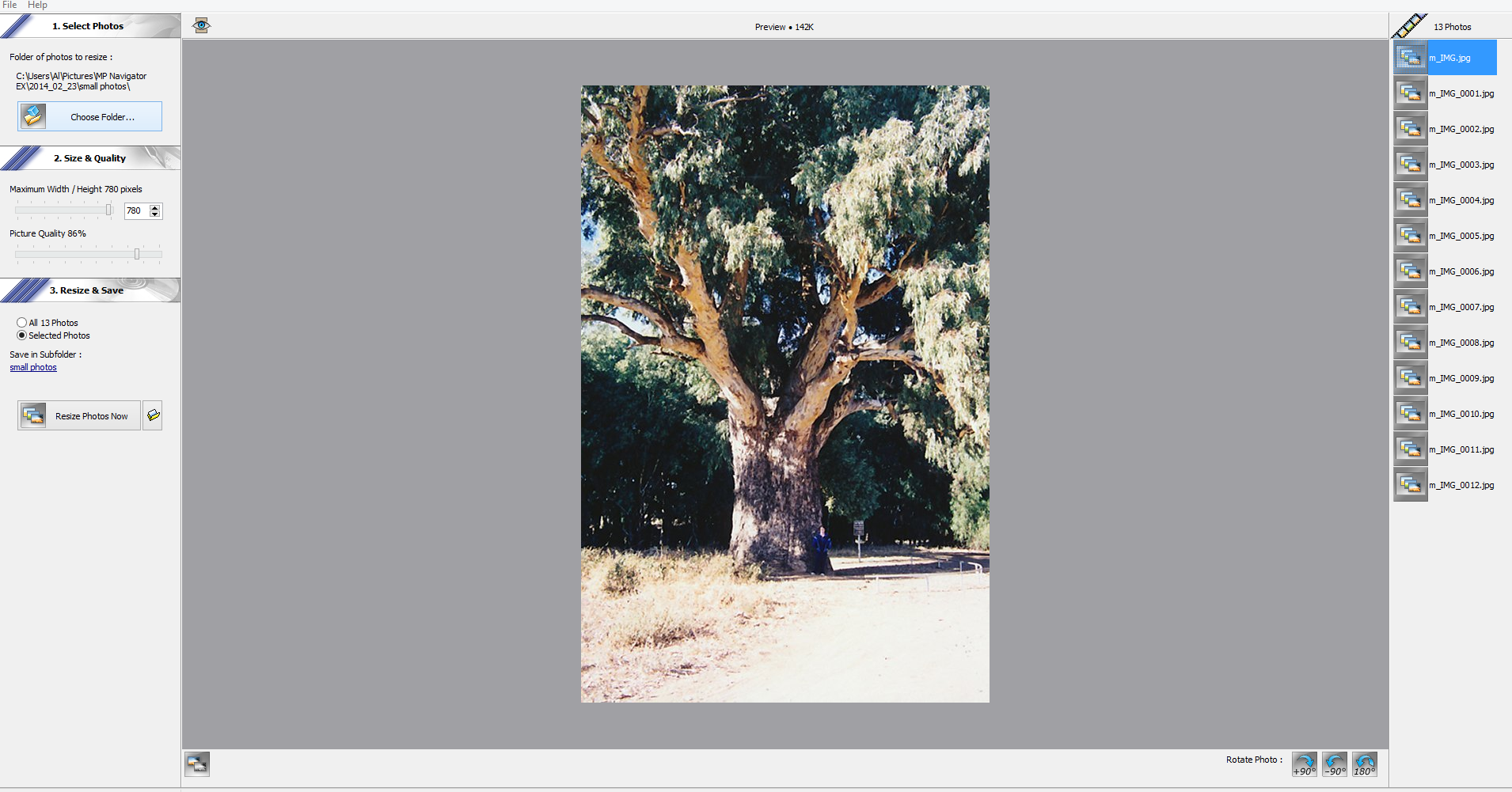
A much simpler way would be to Right Click on the Pic., then in the drop-down box Click on "Send to". Another box will appear, and one of the options will be "Mail Recipient." Click on this and a box will appear. Make sure the "Make my pictures smaller" option is selected, then click on Okay.
The E-mail box will appear, and all you then have to do, is type in the address it's to go to.
Very simple really.
Failing this, Download the free "Prish Resizer". It's a very simple programme. [Believe me, if I can use it, any-one can.] It will put all your downsized Pics. into a folder of their own. When downsizing for the computer, you will be given 4 different sizes to choose from. A good size is 640X480.
Cheers,
Sheba.
-- Edited by Sheba on Tuesday 10th of February 2015 09:00:35 PM
Assuming that you are on a windows machine..
Open the Picture in " PAINT "
Do Select All..
Do Resize and if the pic is 5Mb+ then in the vertical change from 100 to 20 which will reduce it to about 20%.. then Hit the Crop button..
Which should reduce the pic to well under 1Mb..
Then do a save as and rename it XXXX-sm.jpeg..
Yo are done.. You don't need a separate program it should already be on what ever you are using..
juergen
another good way is you sign up to something like photobucket.com , its free...
then upload all your pics that you want there, and send them the link below
then the person who you want can then access the pics ,
all they have to do is right mouse click on the pic and and save them to download to their computer
I think it should stay the same size too...
http://s957.photobucket.com/user/miloguyaus/library/
you can even make separate albums too like I have done, which makes it easier to find things..
hope that helps
milo
-- Edited by milo on Wednesday 11th of February 2015 03:52:31 PM
Mick
As an alternative - If you run the Microsoft Office suite it will also do it.
View the pic.
Select "Edit pics"
Select "Resize pics" and choose from the drop down menu what you need.
(large or small document size / large or small web size or large or small email size)
cheers TG.
Sheba is correct, assuming your using a windows operating system.
Right click > send to, then follow instructions.
Messing with programs to reduce the image size is a real pain, and unnecessary.
Because then you have downgraded pics that aren't much good for printing at normal sizes, if you ever want to print them. Always best to keep original pics at the highest resolution and quality possible and only downsize as a copy.
I use FastStone photo resizer free download and it does batches at a time.....